6. Observability stack
Install this before deploying DMF containers. The observability stack provides the instrumentation needed to profile containers, generate DMF-CRM manifests, and validate benchmark results. A run is only as good as its evidence.
Architecture Overview
For a detailed architecture breakdown, see observability-architecture.md.
Visual overview:
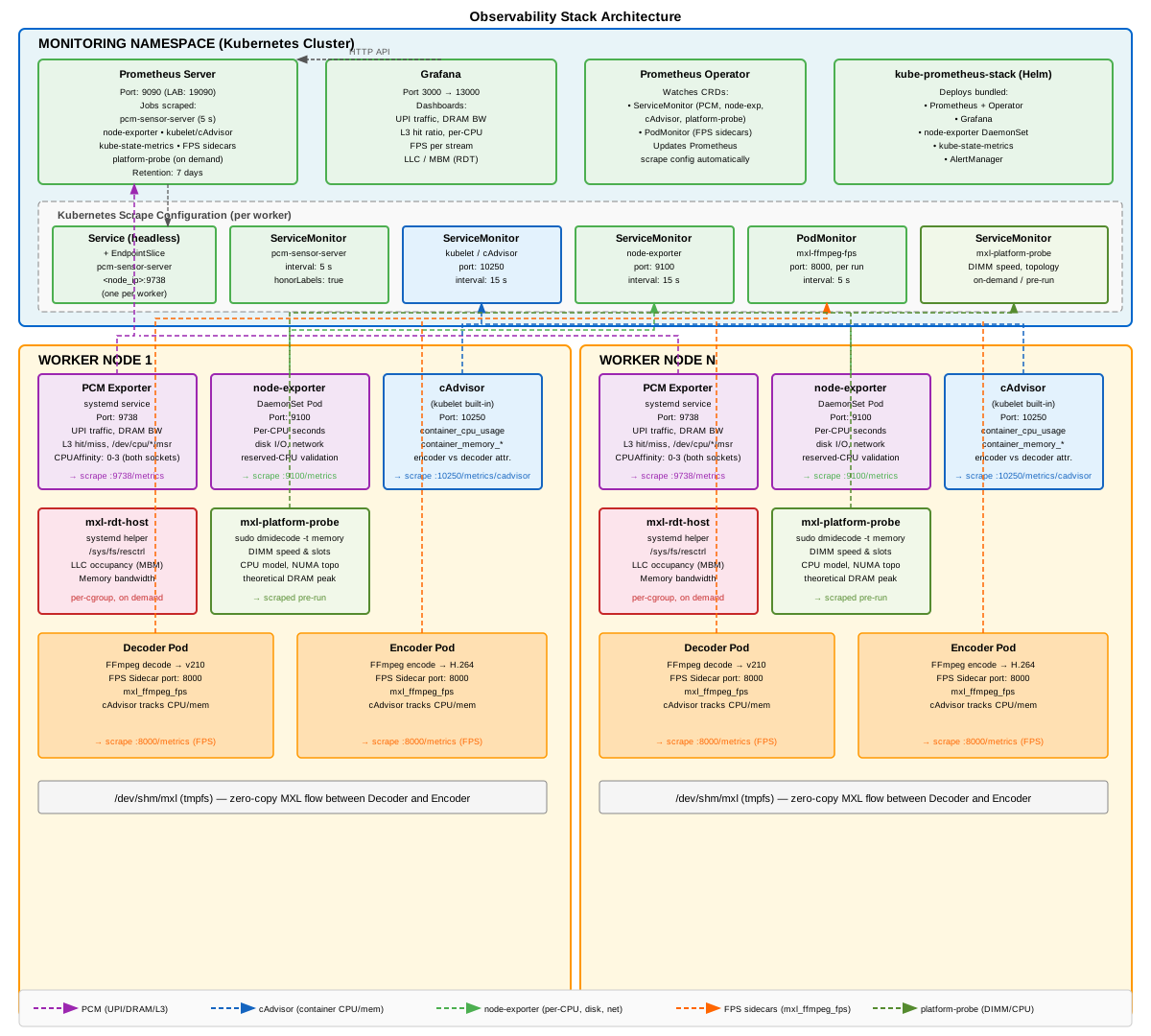
Metric Sources
Five independent metric sources, each answering something none of the others can.
| Source | Runs as | Answers |
|---|---|---|
| FFmpeg FPS sidecar | a container in every decoder/encoder Pod | Did each stream hold 60 FPS? (mxl_ffmpeg_fps) |
| cAdvisor (kubelet) | built in | Per-container CPU time — encoder vs decoder attribution |
| node-exporter | DaemonSet | Per-CPU utilisation — which cores worked, and whether reserved CPUs stayed quiet |
| Intel PCM | host systemd service | Cross-socket UPI traffic, DRAM read/write, L3 hit ratio — whole-socket uncore counters |
Intel RDT (resctrl) |
on demand, per run | Per-cgroup LLC occupancy and memory bandwidth — see 12-rdt-qos.md |
Install, in two commands
scripts/bootstrap-worker.sh            # worker side: PCM, RDT helper, stress-ng, DMI probe
scripts/install-observability.sh       # cluster side: Prometheus, Grafana, scrape wiring
Order matters: the second script checks that the first one's PCM exporter is
actually serving counters, and warns you by name if it is not. It also needs
helm on the machine you run it from (00-before-you-start.md,
step 2), and stops with FATAL: helm is not installed if it is missing.
What bootstrap-worker.sh installs
It stages five installers on the worker and runs them there as root (the worker's
sudo password is typed into the worker's own prompt):
| Installer | Result |
|---|---|
install-worker-limits.sh |
Raises fs.inotify.max_user_instances to 8192 in /etc/sysctl.d/99-mxl-perf-lab.conf. Every MXL flow holds an inotify instance and the kernel default of 128 is shared with kubelet, containerd, systemd and journald. |
install-pcm-host.sh |
Builds pcm-sensor-server from intel/pcm (pinned PCM_REF=2026-07-08-public), installs it to /usr/local/sbin, and runs it as pcm-sensor-server.service on port 9738. |
install-host-noise.sh |
stress-ng, numactl, util-linux — the host-scoped noisy neighbor |
install-rdt-host.sh |
Mounts /sys/fs/resctrl and installs the mxl-rdt-host helper with a narrow sudoers rule |
install-platform-probe.sh |
A read-only sudo rule for dmidecode -t memory, so a run can read the real DIMM speed and compute the theoretical DRAM peak |
What install-observability.sh installs
kube-prometheus-stackvia Helm into namespacemonitoring, values in observability/kube-prometheus-values.yaml.- For every worker: a headless
Service, a hand-writtenEndpointSlicepointing at the node IP, and aServiceMonitor(observability/pcm-host-scrape.yaml) — this is how Prometheus scrapes a host process under the job labelpcm-sensor-server. - A check that Prometheus really reports
up{job="pcm-sensor-server"}.
Access
Prometheus
Prometheus is the metrics query and API endpoint. It is not exposed outside the
cluster; the helper script creates a local port-forward from 127.0.0.1:19090
to the in-cluster Prometheus service, so the UI and API are only reachable from
the machine running the command:
scripts/port-forward-prometheus.sh # then http://127.0.0.1:19090
Keep this command running in its own terminal while you need access. Press
Ctrl-C to stop the forward.
LAB_PROM_URL in config/lab.env is http://127.0.0.1:19090. If nothing is
listening there when a run starts, the runner opens the port-forward itself and
closes it afterwards — you never have to remember.
Grafana
Grafana is the browser-based visualisation and dashboard UI. The kubectl
command below forwards local port 13000 to the Grafana service in the
monitoring namespace. Once it is running, open http://127.0.0.1:13000 in
your browser.
The second command retrieves the auto-generated admin password from the
Kubernetes Secret and base64-decodes it. The username is admin.
Repository-provided Grafana dashboards live under
monitoring/dashboards/ and the import notes are
in monitoring/README.md, including the option to
upload a dashboard JSON file or copy/paste its contents into Grafana.
Two dashboards are intended as the everyday starting points:
system-overview-grafana-dashboard.json— Default operational view. Loads quickly and answers "is the system healthy?" by showing workload FPS, node CPU/memory, DRAM bandwidth, package/DRAM power, thermal headroom, IPC, UPI, PCIe, and observability status.pcm-extended-grafana-dashboard.json— Deep-dive investigation view. Full hardware-counter detail: per-socket L2/L3 cache, IPC, DRAM bandwidth, power, frequency, PCIe, thermal headroom, and measurement interval.
kubectl -n monitoring port-forward svc/monitoring-grafana 13000:80
kubectl -n monitoring get secret monitoring-grafana \
  -o jsonpath='{.data.admin-password}' | base64 -d    # user: admin
Keep the port-forward command running in its own terminal while you need
access to the dashboard. Press Ctrl-C to stop the forward.
Verify Configuration
scripts/preflight.sh
Next: 07-container-deployment.md — deploy decoder and encoder Pods.